With the Zoetis connection in CattleMax, ranchers can import and view INHERIT Select® results directly within their herd records. Access accurate, up-to-date data where you already manage your cattle, so you can make informed decisions faster.
This connection is designed for CattleMax customers using Zoetis genomic testing. By bringing INHERIT Select® results into CattleMax, you’ll save time and keep data consistent across systems.
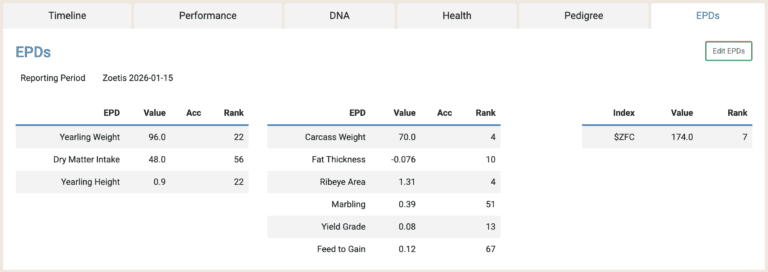
The Zoetis connection links your genomic results directly to your cattle records in CattleMax. Once imported, INHERIT Select® EPDs appear on each animal’s EPD tab (Requires a Registered plan), giving you quick access to accurate performance data right where you manage your herd. Zoetis values automatically replace any existing Breed Association EPDs, keeping your records consistent and up to date without extra steps.
Key Benefits
Seamless EPD Integration: Bring your Zoetis INHERIT Select® EPDs and genomic results directly into CattleMax for a clear, unified view of each animal’s performance data.
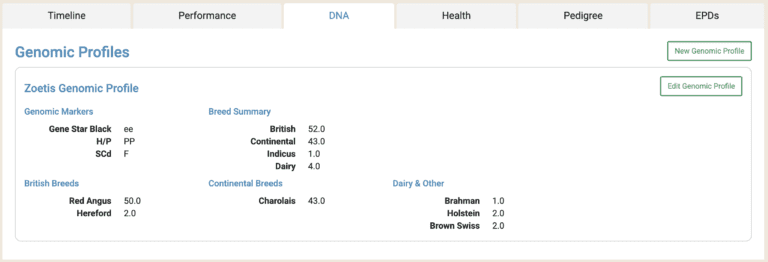
Complete tracking of INHERIT Select® Results: Other genomic results, including breed compositions and tests, will appear in the Genomic Profiles area, including the DNA tab.
Accurate Recordkeeping: Automatically match results to DNA barcodes, ensuring INHERIT Select® results are linked to the correct animal.
Everything in One Place: Zoetis INHERIT Select® EPDs are stored in the EPDs area just like EPDs from a Breed Association, keeping your herd records accurate and up to date without extra work.
"It's going to be a game changer when it comes to our commercial cow herd. It’s giving us a more accurate depiction of what that animal’s profile looks like and what she possibly can do."
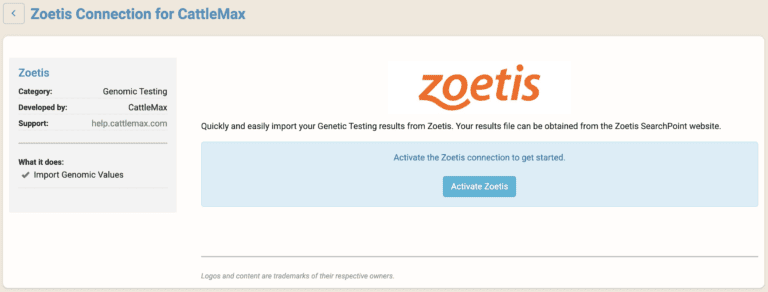
From within your CattleMax account, go to Settings > Partner Integrations, select Zoetis, then click to Enable the Integration.
Once the Zoetis Partner Integration is enabled, simply go to the Cattle screen, click Import, and click Zoetis. You can then upload your results file obtained from SearchPoint.
After your results are imported, you can view them from any animal’s Profile screen or by running reports.
For step-by-step guidance, visit our Help Article for a complete walkthrough on setting up and using the Gallagher integration.
Have questions or need assistance? We’re happy to help! Contact CattleMax